HomeHow-To GuidesCreate a Job Feed Filtered by Budget & Quality Constraints
All Guides
Feed Automation2 min interactive demoArcade Interactive Walkthrough

Create a Job Feed Filtered by Budget & Quality Constraints

Configure custom keywords, title requirements, minimum hourly rates, and client spend thresholds. RealBids continuously monitors the Upwork live stream and matches opportunities tailored strictly to your skill set.

Filter by Hourly Minimum ($/hr) & Fixed Floor
Include Mandatory Keywords & Exclude Spam Terms
Evaluate Historical Today-Matches Instantly
Interactive Walkthrough: Create a Job Feed Filtered by Budget
Click to Step Through
Live Stream Matching & In-App Alert NotificationsReal-Time Feed Stream

Once your feed rule is active, matching jobs are highlighted in green ('MATCHED') on the live stream and pop up instantly under the Live Feed Alerts notification center in your top header.
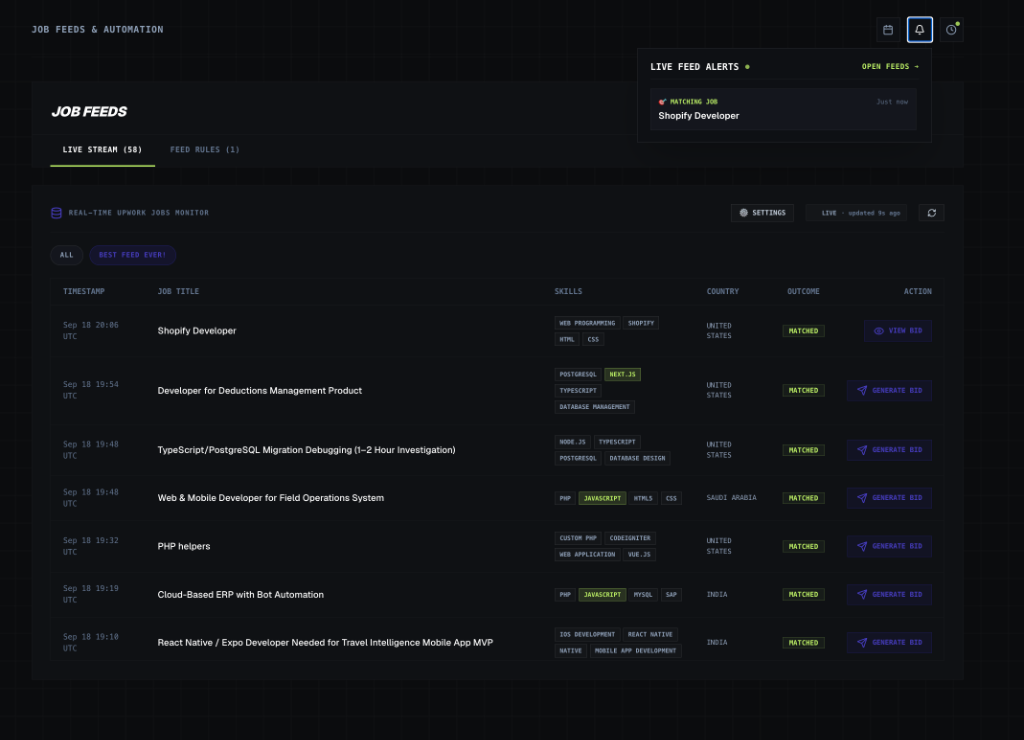
Real-Time Upwork Job Monitor with Live Alert Notification Bell
Slack IntegrationInstant

⚡ Turn Feed Matches into Instant Slack Push Notifications

Want immediate mobile & desktop push alerts the second a job matches your custom feed criteria? Link your Slack workspace to receive real-time job cards with 1-click apply links.

Set Up Slack Push Alerts (Guide 03) →

Step-by-Step Instructions

1
Open Feed Configuration
From your Job Feeds dashboard, click on '+ Add Feed' to open the configuration modal.
2
Set Name & Matching Strategy
Name your feed (e.g., 'React & Next.js Hourly') and choose between 'Match Any Keyword' or 'Ranked Weighted Strategy'.
3
Specify Category & Keywords
Select your primary category and enter core skills you specialize in, along with negative keywords to exclude unwanted listings.
4
Set Budget & Quality Thresholds
Define your minimum hourly rate or fixed-price budget floor, minimum client rating, and total client spend.
5
Evaluate & Save Matches
RealBids instantly checks today's stream for existing matches. Choose to import today's matched jobs or start fresh.

Strategic Pro-Tips

Pro Tip #1

Setting a minimum client rating of 4.5+ effectively screens out low-quality or dispute-prone clients in historical feed data.

Pro Tip #2

Use 'Title Must Contain' for high-intent keywords when you only want listings explicitly mentioning your niche in the headline.

Pro Tip #3

MRR Mode calculates duration-normalized monthly recurring revenue for agencies and retainer-focused freelancers.

Next Tutorial
Generate an On-Demand AI Proposal for a Job Listing
You Just Learned This — Now Set It Up

Put this guide to work on your own account.

Sign up free and follow the same steps in your own dashboard — no card required.

Start Winning Today