HomeHow-To GuidesConnect RealBids to Slack for Instant Mobile & Desktop Job Alerts
All Guides
Slack Bot Integration2 min visual guideStep-by-Step Visual Showcase

Connect RealBids to Slack for Instant Mobile & Desktop Job Alerts

Speed is the decisive advantage on Upwork. Connecting RealBids with Slack sends rich, formatted job cards with client verification, spent budget, screening questions, and direct 1-click apply links right to your phone or desktop within seconds of publication.
Sub-Minute Push Alerts on iOS, Android & Desktop
Pre-Formatted Job Cards with Client Trust Metrics
Interactive 1-Click 'View on Upwork' Apply Button
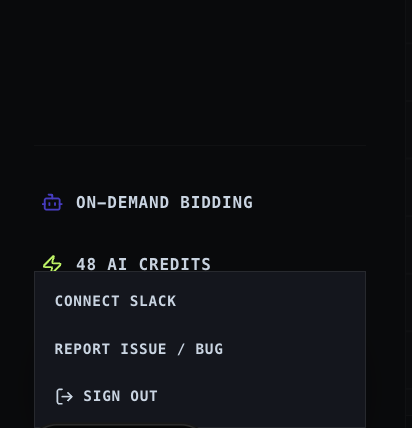
1. Open Profile Menu & Select 'Connect Slack'
From your dashboard navigation, click your profile menu in the bottom-left and select 'Connect Slack'.
1 of 4
Dashboard user menu popup highlighting the Connect Slack option
Feed FilteringRecommended

🎯 Filter What Reaches Your Slack Channel with Feed Rules

Only want high-budget jobs or specific keywords pushed to Slack? Create and customize feed rules to curate your incoming notification stream.

Learn How to Create Job Feeds (Guide 01) →

Step-by-Step Instructions

1
Open the User Menu in Dashboard
Click your account indicator in the bottom-left navigation and choose 'Connect Slack'.
2
Join Workspace with Registered Email
Click 'Join Slack Workspace' in the confirmation modal. Ensure you join with your registered RealBids email address.
3
Access the RBS - Job Alerts Channel
Once joined, the RealBids Bot will automatically verify your account and begin streaming matched opportunities to your #Messages feed.
4
Apply in Under 60 Seconds
Whenever a matching job is published, your phone and desktop receive an immediate push alert with client stats and a direct link to Upwork.

Strategic Pro-Tips

Pro Tip #1

Enable Slack VIP Mobile Notifications for the RBS Bot channel so you never miss high-value listings while away from your desk.

Pro Tip #2

Submitting within 5–10 minutes of receiving a Slack push alert gives you first-mover advantage before 50+ freelancers flood the proposal pool.

Pro Tip #3

Check the Slack App Home tab anytime to monitor your 24-hour scan rate and feed matching health.

Previous Tutorial
Submit Bid and Updating Bid Tracking View
Next Tutorial
Set Financial Objectives for Your Bidding Strategy
You Just Learned This — Now Set It Up

Put this guide to work on your own account.

Sign up free and follow the same steps in your own dashboard — no card required.

Start Winning Today